Logo
Order parts Advanced warranty replacement Repair and Return
Greenlite Assistance On-Site Service Repair Ordering a Part Part Returns Repair and Return Warranty Replacement Feature Enhancement or Bug
Contact Us Sign in
  1. VendNet
  2. Model 3623, 3624, 3625, 3626, 3627, 3628
  3. Programming

Programming (Flex Keypad)

Chad
Updated August 24, 2022 17:06


DIY/How To
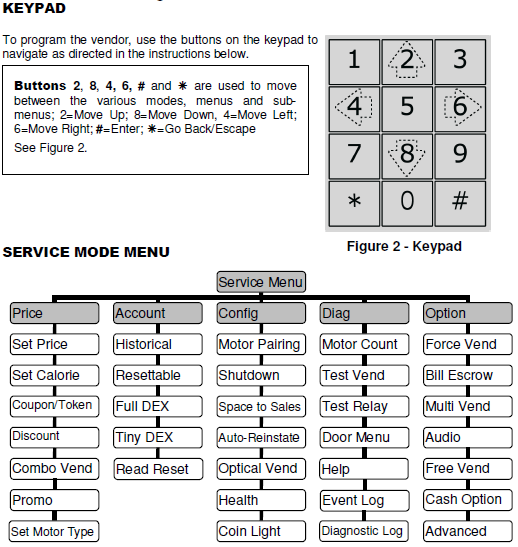
This article shows you how to navigate your Flex board using a keypad. You are able to download the Flex control board manual for programming.
Considerations
 

Watch Flex Programming Tutorials

Press the service mode button.
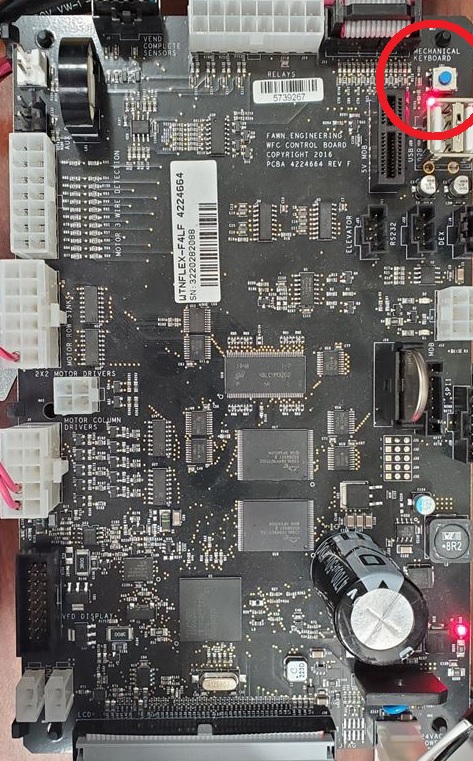
 

Flex.jpg


Use these keys to navigate the menu. 


mceclip0.png

Set_Prices_Flex_Keypad.jpg


Download the Flex manual to find the settings you'd like to change.            Flex-Manual.pdf


  • Flex-Manual.pdf
    (3 MB)
Was this article helpful?
0 out of 0 found this helpful

Comments

0 comments

Please sign in to leave a comment.

Articles in this section

  • Software Update (Flex Keypad)
  • Temperature Settings Chart (Flex & GVC)
  • Software Update (Flex Touch Screen)
  • Programming (Flex Keypad)
Order Parts
Easily and securely order parts on our website 24/7.
Schedule a call with an In-House Technician
Our certified technicians are here to help you fix any issues with vending machines.
Contact us
Do you need assistance with Greenlite Cashless or would like request an on-site service technician or have a parts question? Submit a ticket to get all of your questions answered and receive assistance.
View ‘How To’ Videos
Our extensive video library provides step-by-step instructions on how to complete a wide range of simple tasks from changing a motor to setting up your new vendor for the first time.

© VendNet

Theme by Lotus Themes

Facebook Twitter YouTube LinkedIn Instagram
Powered by Zendesk